Mobile Pixels Duex Plus DS Monitor Screen Extender
The Duex Plus mobile screen extension from Mobile Pixels sets a new level of convenience, flexibility and multitasking. With the help of the magnetic mounting, your own laptop is effortlessly and quickly expanded into a mobile workstation, allowing gaming and entertainment beyond the edge of the screen. The Full HD display offers high-resolution screen performance, making it an ideal match for any challenge. The case is made of high-quality and robust ABS plastic and aluminium to withstand all the challenges of everyday life. Weighing in at just 590 grams, it emphasizes the lightness that comes with the Duex Plus. True mobility with simple comfort.
Flexible and powerful use
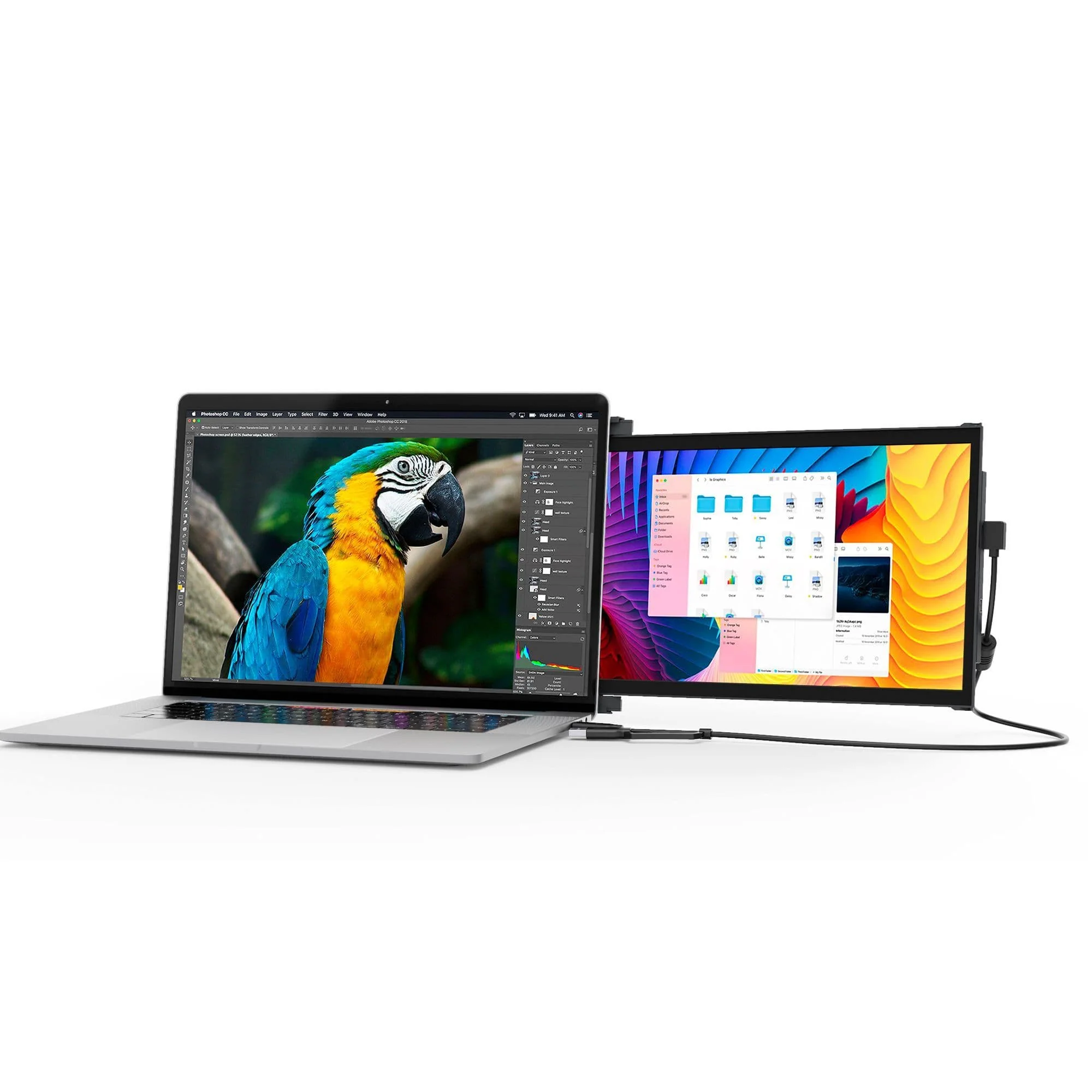
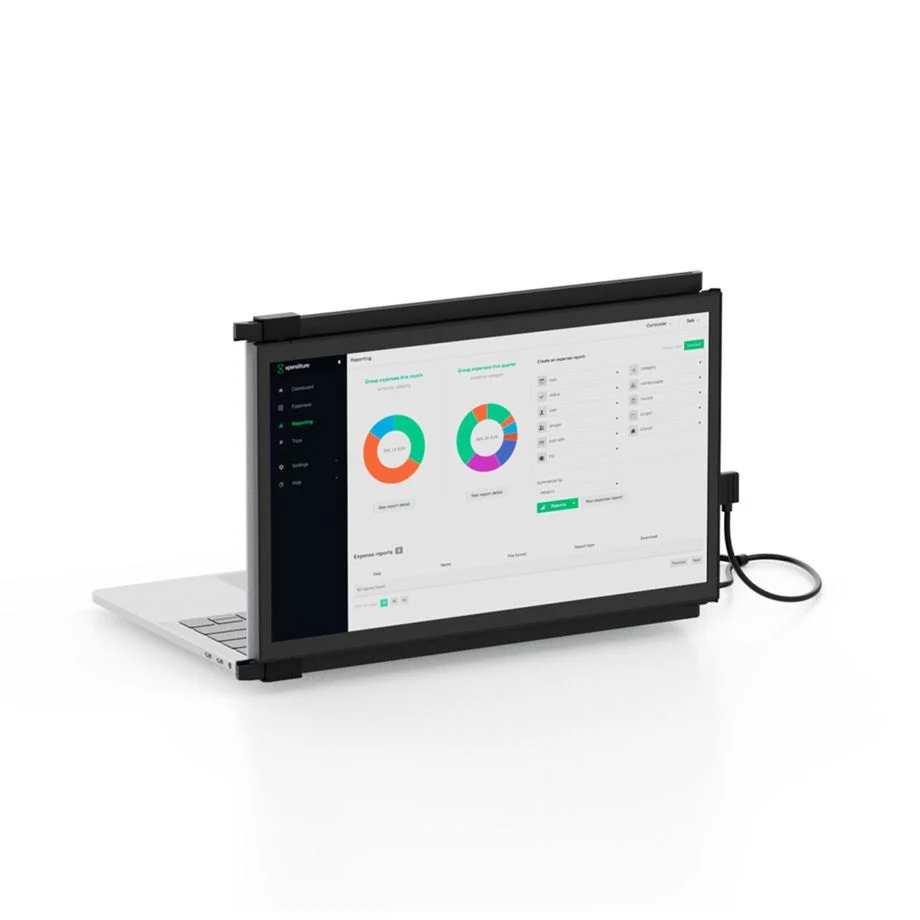
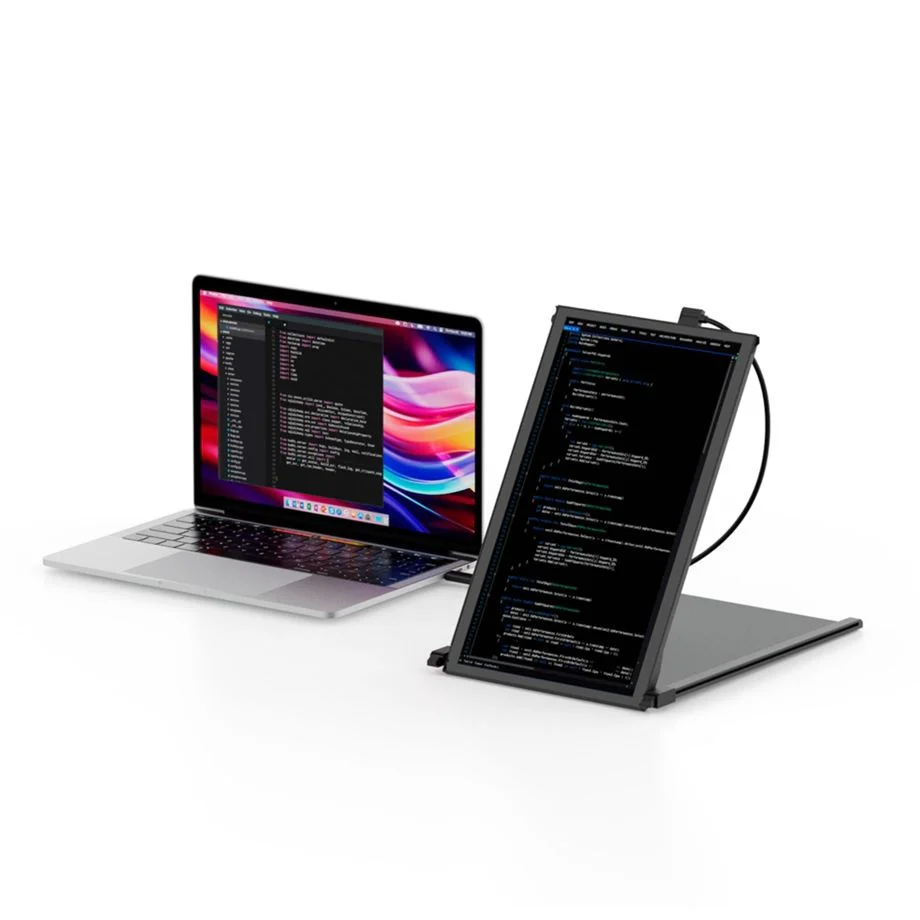
The 13.3-inch screen extension can be conveniently connected to the laptop via the included dual USB-C to USB-A and USB-C cable. Duex Plus attaches using the included magnets, which can be attached to the back of the laptop using 3M adhesive pads and extends to either side of the laptop. It offers a resolution of 1080-pixels, while the colour experience can be customized to suit the work environment thanks to adjustable brightness levels and colon temperatures. Furthermore, the 270-degree rotation enables different modes: presentation mode, portrait mode and landscape mode. The integrated gyro sensors automatically detect the respective screen orientation so that the content is rotated accordingly. Duex Max is suitable for magnetic attachment to screens with a diagonal of 13 to 14 inches.
Simple installation and versatile use
The Duex Max LCD screen works with Apple macOS, Microsoft Windows, Nintendo Switch and DeX. The external screen's connectivity options include a USB-C and a mini-HDMI ports, one of which enables high video transmission thanks to DisplayPort. Mobile Pixels' powerful Duex Plus screen combines a sleek design with mobility and convenience.
- Mobile 13.3-inch screen for quick, easy and flexible work
- Slim design and easily portable for increased productivity and efficient multitasking
- Mounts to own laptop with included magnets
- Display: matt and anti-reflective
- Flexible orientation and individual positioning of the Duex Max screen with 270° rotation (portrait mode, landscape mode and presentation mode)
- Automatic screen alignment thanks to gyro sensors
- Choice of two different display modes for Windows and MacOS: mirrored desktop, extended desktop
- Individual adjustment of colour temperature, contrast, brightness and colour saturation
- EyeCare mode adjusts colour temperature and lighting in dark environments to reduce eye strain
- Compatible with laptops with a screen diagonal of 13 to 14 inches, tablets, smartphones and Nintendo Switch: Apple macOS, Microsoft Windows, Android (support for Samsung Dex), Google Chrome OS
- Ports: 1x USB-C, 1x Mini HDMI
- Duex Plus connects to the respective device using the included USB-C cable: dual connector with USB-C and USB-A plugs
- When transferring via USB-A connector, the installation of a driver is necessary
- LCD screen with 16:9 aspect ratio
- Screen resolution: Full HD 1080 pixels (1920 x 1080) at 60 Hz
- Screen brightness: 300 candela per square meter, contrast 700:1
- Reaction time: 30 milliseconds
- Maximum wattage: 4.5 watts
- Made of durable PC-ABS plastic and sturdy aluminium alloy
- Dimensions: 12.25 x 8.46 x 0.25 inch
- Weight: 590 grams
- Included in delivery: Duex Plus, USB-C cable with dual connection: USB-C and to USB-A (1 meter), 4 x magnets and template for mounting the Duex Plus screen, 12 x 3M stickers, cleaning cloth, instruction manual
Immerse yourself with Duex Plus DS 1080P FHD monitor. Take your laptop experience to the next level by easily expanding your laptop monitor. Customize the display to your work with Duex Plus DS's flexible modes.
Older laptop? No problem! If your computer has a USB-C port with DisplayPort enabled (this is built into the computer), the device will be plug-and-play. Otherwise, see the manufacturer's page for easy driver installation here.
Switch between Landscape for data analysis, Portrait for coding and reading, Kickstand for professional presentations, and Presentation for collaborative meetings. Experience adaptability that suits your ever-changing tasks.
More Images
Mobile Pixels Duex Plus DS Monitor Screen Extender
The Duex Plus mobile screen extension from Mobile Pixels sets a new level of convenience, flexibility and multitasking. With the help of the magnetic mounting, your own laptop is effortlessly and quickly expanded into a mobile workstation, allowing gaming and entertainment beyond the edge of the screen. The Full HD display offers high-resolution screen performance, making it an ideal match for any challenge. The case is made of high-quality and robust ABS plastic and aluminium to withstand all the challenges of everyday life. Weighing in at just 590 grams, it emphasizes the lightness that comes with the Duex Plus. True mobility with simple comfort.
Flexible and powerful use
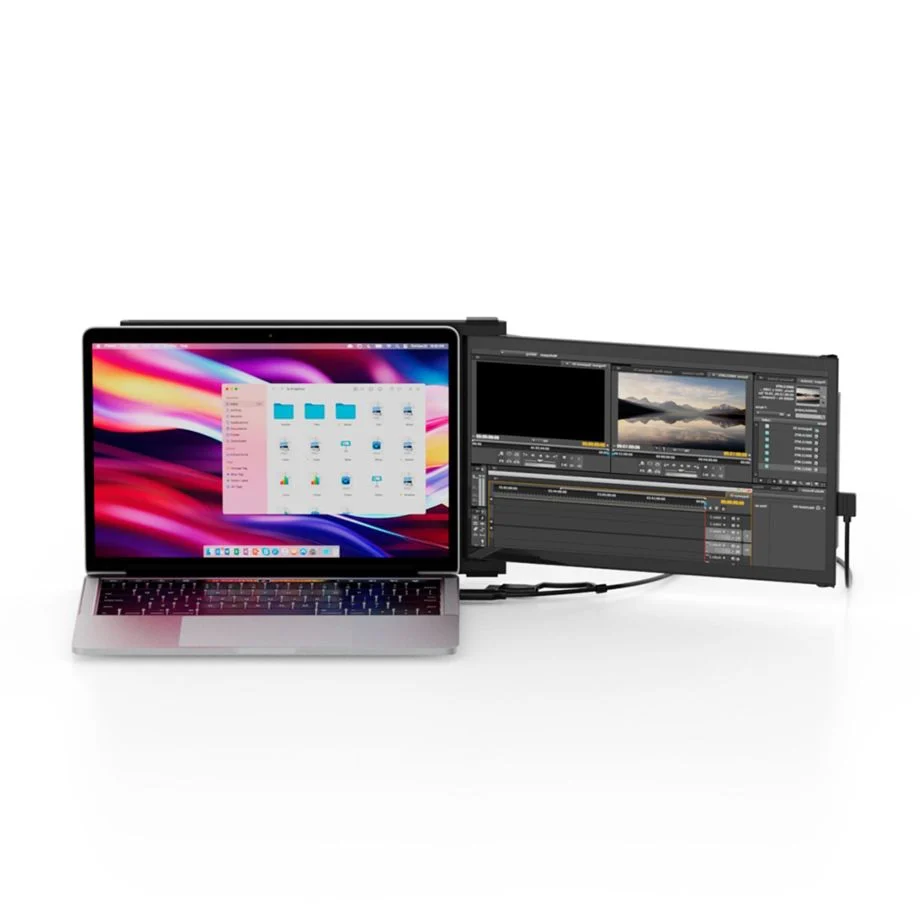
The 13.3-inch screen extension can be conveniently connected to the laptop via the included dual USB-C to USB-A and USB-C cable. Duex Plus attaches using the included magnets, which can be attached to the back of the laptop using 3M adhesive pads and extends to either side of the laptop. It offers a resolution of 1080-pixels, while the colour experience can be customized to suit the work environment thanks to adjustable brightness levels and colon temperatures. Furthermore, the 270-degree rotation enables different modes: presentation mode, portrait mode and landscape mode. The integrated gyro sensors automatically detect the respective screen orientation so that the content is rotated accordingly. Duex Max is suitable for magnetic attachment to screens with a diagonal of 13 to 14 inches.
Simple installation and versatile use
The Duex Max LCD screen works with Apple macOS, Microsoft Windows, Nintendo Switch and DeX. The external screen's connectivity options include a USB-C and a mini-HDMI ports, one of which enables high video transmission thanks to DisplayPort. Mobile Pixels' powerful Duex Plus screen combines a sleek design with mobility and convenience.
- Mobile 13.3-inch screen for quick, easy and flexible work
- Slim design and easily portable for increased productivity and efficient multitasking
- Mounts to own laptop with included magnets
- Display: matt and anti-reflective
- Flexible orientation and individual positioning of the Duex Max screen with 270° rotation (portrait mode, landscape mode and presentation mode)
- Automatic screen alignment thanks to gyro sensors
- Choice of two different display modes for Windows and MacOS: mirrored desktop, extended desktop
- Individual adjustment of colour temperature, contrast, brightness and colour saturation
- EyeCare mode adjusts colour temperature and lighting in dark environments to reduce eye strain
- Compatible with laptops with a screen diagonal of 13 to 14 inches, tablets, smartphones and Nintendo Switch: Apple macOS, Microsoft Windows, Android (support for Samsung Dex), Google Chrome OS
- Ports: 1x USB-C, 1x Mini HDMI
- Duex Plus connects to the respective device using the included USB-C cable: dual connector with USB-C and USB-A plugs
- When transferring via USB-A connector, the installation of a driver is necessary
- LCD screen with 16:9 aspect ratio
- Screen resolution: Full HD 1080 pixels (1920 x 1080) at 60 Hz
- Screen brightness: 300 candela per square meter, contrast 700:1
- Reaction time: 30 milliseconds
- Maximum wattage: 4.5 watts
- Made of durable PC-ABS plastic and sturdy aluminium alloy
- Dimensions: 12.25 x 8.46 x 0.25 inch
- Weight: 590 grams
- Included in delivery: Duex Plus, USB-C cable with dual connection: USB-C and to USB-A (1 meter), 4 x magnets and template for mounting the Duex Plus screen, 12 x 3M stickers, cleaning cloth, instruction manual
Immerse yourself with Duex Plus DS 1080P FHD monitor. Take your laptop experience to the next level by easily expanding your laptop monitor. Customize the display to your work with Duex Plus DS's flexible modes.
Older laptop? No problem! If your computer has a USB-C port with DisplayPort enabled (this is built into the computer), the device will be plug-and-play. Otherwise, see the manufacturer's page for easy driver installation here.
Switch between Landscape for data analysis, Portrait for coding and reading, Kickstand for professional presentations, and Presentation for collaborative meetings. Experience adaptability that suits your ever-changing tasks.
Product Information
Product Information
Shipping & Returns
Shipping & Returns
Description
The Duex Plus mobile screen extension from Mobile Pixels sets a new level of convenience, flexibility and multitasking. With the help of the magnetic mounting, your own laptop is effortlessly and quickly expanded into a mobile workstation, allowing gaming and entertainment beyond the edge of the screen. The Full HD display offers high-resolution screen performance, making it an ideal match for any challenge. The case is made of high-quality and robust ABS plastic and aluminium to withstand all the challenges of everyday life. Weighing in at just 590 grams, it emphasizes the lightness that comes with the Duex Plus. True mobility with simple comfort.
Flexible and powerful use
The 13.3-inch screen extension can be conveniently connected to the laptop via the included dual USB-C to USB-A and USB-C cable. Duex Plus attaches using the included magnets, which can be attached to the back of the laptop using 3M adhesive pads and extends to either side of the laptop. It offers a resolution of 1080-pixels, while the colour experience can be customized to suit the work environment thanks to adjustable brightness levels and colon temperatures. Furthermore, the 270-degree rotation enables different modes: presentation mode, portrait mode and landscape mode. The integrated gyro sensors automatically detect the respective screen orientation so that the content is rotated accordingly. Duex Max is suitable for magnetic attachment to screens with a diagonal of 13 to 14 inches.
Simple installation and versatile use
The Duex Max LCD screen works with Apple macOS, Microsoft Windows, Nintendo Switch and DeX. The external screen's connectivity options include a USB-C and a mini-HDMI ports, one of which enables high video transmission thanks to DisplayPort. Mobile Pixels' powerful Duex Plus screen combines a sleek design with mobility and convenience.
- Mobile 13.3-inch screen for quick, easy and flexible work
- Slim design and easily portable for increased productivity and efficient multitasking
- Mounts to own laptop with included magnets
- Display: matt and anti-reflective
- Flexible orientation and individual positioning of the Duex Max screen with 270° rotation (portrait mode, landscape mode and presentation mode)
- Automatic screen alignment thanks to gyro sensors
- Choice of two different display modes for Windows and MacOS: mirrored desktop, extended desktop
- Individual adjustment of colour temperature, contrast, brightness and colour saturation
- EyeCare mode adjusts colour temperature and lighting in dark environments to reduce eye strain
- Compatible with laptops with a screen diagonal of 13 to 14 inches, tablets, smartphones and Nintendo Switch: Apple macOS, Microsoft Windows, Android (support for Samsung Dex), Google Chrome OS
- Ports: 1x USB-C, 1x Mini HDMI
- Duex Plus connects to the respective device using the included USB-C cable: dual connector with USB-C and USB-A plugs
- When transferring via USB-A connector, the installation of a driver is necessary
- LCD screen with 16:9 aspect ratio
- Screen resolution: Full HD 1080 pixels (1920 x 1080) at 60 Hz
- Screen brightness: 300 candela per square meter, contrast 700:1
- Reaction time: 30 milliseconds
- Maximum wattage: 4.5 watts
- Made of durable PC-ABS plastic and sturdy aluminium alloy
- Dimensions: 12.25 x 8.46 x 0.25 inch
- Weight: 590 grams
- Included in delivery: Duex Plus, USB-C cable with dual connection: USB-C and to USB-A (1 meter), 4 x magnets and template for mounting the Duex Plus screen, 12 x 3M stickers, cleaning cloth, instruction manual
Immerse yourself with Duex Plus DS 1080P FHD monitor. Take your laptop experience to the next level by easily expanding your laptop monitor. Customize the display to your work with Duex Plus DS's flexible modes.
Older laptop? No problem! If your computer has a USB-C port with DisplayPort enabled (this is built into the computer), the device will be plug-and-play. Otherwise, see the manufacturer's page for easy driver installation here.
Switch between Landscape for data analysis, Portrait for coding and reading, Kickstand for professional presentations, and Presentation for collaborative meetings. Experience adaptability that suits your ever-changing tasks.